
Social media platforms have undergone massive transformations over the last decade. Most public networking platforms focus heavily on public performance, encouraging users to collect followers, accumulate public likes, and broadcast their personal lives to thousands of strangers.
Snapchat took an entirely different design path from its very inception. Built primarily around private, direct communication, Snapchat prioritizes personal one-on-one relationships over public follower counts. One of the central engines driving this private user experience is the Snapchat Best Friends List.
If you open Snapchat every day to send photos, videos, or quick texts, you have certainly noticed a curated list of contacts near the top of your send screen. You may have also noticed distinct text symbols or colored icons next to specific names.
Understanding how this list functions behind the scenes, how Snapchat’s algorithm measures your daily interactions, and what these friendship indicators mean will give you complete clarity over your digital social life.
What Is the Snapchat Best Friends List?
The Snapchat Best Friends list is an automated, algorithmically updated list containing the contacts with whom you communicate most frequently on the platform. Whenever you take a photo or record a video clip using the Snapchat camera, clicking the yellow “Send To” arrow brings up your chat contacts. Positioned right at the top of this menu is your Best Friends section.
The primary purpose of this feature is practical convenience. Instead of forcing you to manually scroll through hundreds of phone contacts or type someone’s username into a search bar every time you want to share a quick moment, Snapchat automatically places your most frequent conversational partners right under your thumb.
It is essential to realize that the Best Friends list is not a permanent or static list. You do not manually build it by selecting checkboxes, nor is it locked in place permanently. Instead, it is a fluid, dynamic system that adjusts continually based on your real-time messaging behavior.
Key Rules and System Characteristics
- Automatic Generation: Snapchat’s internal system continuously evaluates your conversation habits and selects your top connections without requiring any manual setup from you.
- Eight-Friend Limit: Your account can host up to eight best friends at any given point in time.
- Strict Individual Privacy: Since major system updates aimed at user privacy, your official Best Friends list is completely private to your account. External users cannot visit your profile and view a public directory of your top friends.
- Visual Status Indicators: Unique visual indicators (such as heart symbols, flame counters, or smiling faces) appear alongside contact names to denote specific interaction milestones and friendship levels.
How the Snapchat Best Friends Algorithm Works (Behind the Scenes)
Many users mistakenly believe that adding someone as a contact or viewing their public story brings them straight to the top of their Best Friends list. In reality, Snapchat uses a complex, proprietary calculation algorithm designed to measure genuine social engagement.
The algorithm relies primarily on two fundamental pillars: Reciprocity and Consistency.
The Reciprocity Principle (Two-Way Interaction)
The absolute cornerstone of Snapchat’s relationship algorithm is mutual communication. Reciprocity means that both participants must actively contribute to the conversation.
If you send fifty snaps a day to a popular content creator, a public figure, or a acquaintance who rarely replies, that person will never become your Best Friend on Snapchat. The algorithm rewards balanced communication where Person A sends messages to Person B, and Person B actively sends messages back to Person A.
Frequency and Communication Volume
The system tracks the overall number of interactions exchanged between two accounts over rolling time windows. However, volume alone is not the only metric. The distribution of that volume matters significantly.
Exchanging ten snaps every single day for a week generates a vastly higher friendship score than sending seventy snaps in one single burst on Sunday afternoon and remaining inactive for the remainder of the month. Regular daily communication signals strong social ties to the algorithm.
Media Weighting: Camera Snaps vs. Text Chat
While both traditional text messages and direct camera snaps count toward your friendship ranking, direct photo and video snaps carry noticeably more mathematical weight within the algorithm.
Because taking a photo or recording a short video requires more effort than typing a quick text word, Snapchat’s system interprets direct camera snaps as higher-value social interactions. Group chat activity also contributes to your score, but individual one-on-one exchanges carry far greater statistical weight.
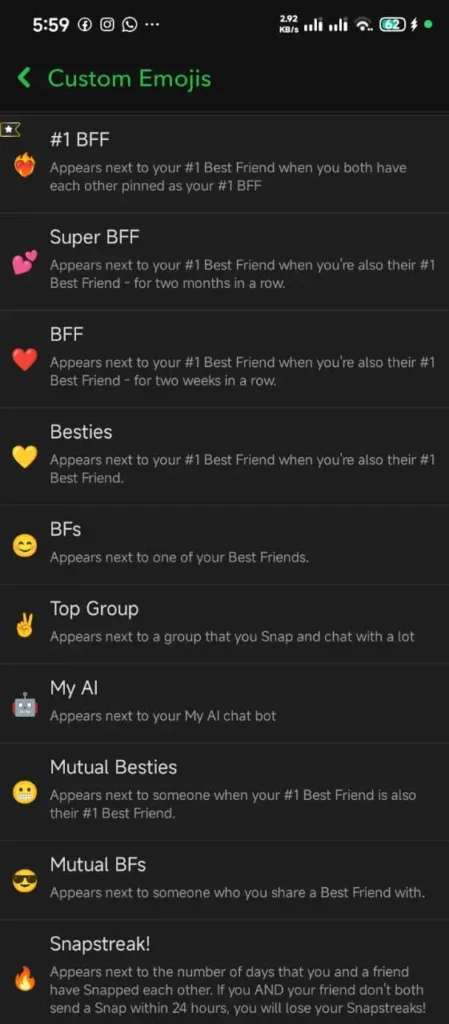
Quick Reference Guide: Snapchat Friend Status Indicators
To help you understand your relationship status at a single glance, Snapchat assigns specific symbols to contacts based on your interaction patterns. Here is a clear breakdown of what each major indicator signifies:
| Emoji | Indicator Name | Plain Text Description | Detailed Meaning in Simple English |
| 💛 | Yellow Heart | Top Mutual Best Friend | You are #1 Best Friends with each other. You send the most snaps to them, and they send the most to you. |
| ❤️ | Red Heart | Two-Week Best Friend | You and this friend have maintained your mutual #1 Best Friend status continuously for 2 straight weeks. |
| 💕 | Pink Hearts | Two-Month Super BFF | You and this friend have held the mutual #1 Best Friend position for 2 consecutive months without interruption. |
| 😊 | Smiling Face | Standard Best Friend | This contact sits within your top 8 Best Friends list, but they are not your overall #1 connection. |
| 😎 | Sunglasses Face | Mutual Close Friend | You and this person share a close friend in common on your respective Best Friends lists. |
| 😬 | Grimacing Face | Shared #1 Best Friend | Your absolute #1 Best Friend is also this person’s absolute #1 Best Friend. |
| 😏 | Smirking Face | One-Sided Best Friend | You are on their Best Friends list, but they are not on your Best Friends list. |
| 🔥 | Snapstreak (Flame) | Daily Streak Counter | You and this contact have snapped each other every day for 3 or more consecutive days. |
| ⌛ | Hourglass | Expiration Warning | Your active Snapstreak is about to expire unless both of you send a camera snap soon. |
| 💯 | Hundred | 100-Day Milestone | You and this connection have maintained a continuous Snapstreak for 100 consecutive days. |
| 🎂 | Birthday Cake | Special Occasion Alert | It is this friend’s birthday today based on their account profile settings. |
Explaining Every Friend Status Symbol in Detail
Understanding what each symbol represents enables you to analyze your social dynamics effortlessly. Let us examine each major status indicator in depth.
The Yellow Heart (Mutual #1 Best Friend) 💛
The Yellow Heart is the foundational symbol of top-tier closeness on Snapchat. It indicates that you and this specific contact are mutually each other’s single biggest conversational partner.
To achieve a Yellow Heart, two conditions must be met simultaneously:
- You must send more snaps and messages to this person than to anyone else in your contact list.
- This person must send more snaps and messages to you than to anyone else in their contact list.
If you send the absolute highest volume of messages to a friend, but that friend sends their highest volume to someone else, you will not earn a Yellow Heart. You will instead see a standard Smiling Face indicator.
The Red Heart (Two-Week Loyalty Milestone) ❤️
The Red Heart represents sustained consistency. When you and your mutual #1 Best Friend manage to keep your Yellow Heart status active for fourteen consecutive days without losing the top spot to another contact, the system automatically upgrades your symbol from a Yellow Heart to a deep Red Heart.
The Pink Hearts (Two-Month Super BFF Status) 💕
The Pink Hearts indicator is the highest honor of friendship available on standard Snapchat. This milestone requires incredible messaging loyalty. You and your top connection must hold the mutual #1 position for two full months (sixty consecutive days).
If your interaction levels dip even for a single day—allowing a third contact to temporarily steal the top spot—the counter resets completely, requiring you to start over from the Yellow Heart stage.
The Smiling Face (Standard Top 8 Best Friend) 😊
The simple Smiling Face symbol indicates that a contact belongs to your elite top eight Best Friends group. You communicate with them frequently enough to earn a spot near the top of your camera send list. You can have up to seven contacts displaying the Smiling Face symbol at the same time, alongside your single #1 Best Friend.
The Sunglasses Face (Mutual Connection) 😎
The Sunglasses symbol does not directly measure the interaction between you and the person who has the icon. Instead, it measures network overlap. It tells you that one of your top eight Best Friends is also on that person’s top eight Best Friends list. It signals that you both belong to the same broader social circle.
The Grimacing Face (Shared #1 Spot) 😬
The Grimacing Face symbol reveals an intense social rivalry or shared primary connection. It appears when your primary #1 Best Friend is also the exact primary #1 Best Friend of another user. It shows that both of you are competing for or sharing the same top conversational partner on the app.
The Snapstreak (Flame) Indicator 🔥
The Snapstreak symbol displays a Flame icon alongside a numerical counter (for example, Flame 100). This counter tracks how many consecutive days you and a friend have exchanged direct photo or video snaps within strict 24-hour windows.
To keep a Snapstreak active, both participants must send at least one picture or video snap every 24 hours. Text chats, group messaging, voice calls, and story posts do not count toward preserving a Snapstreak.
Snapchat Plus vs. Standard Best Friends Features
While standard Snapchat gives every user access to the basic Best Friends list and status indicators for free, subscribing to Snapchat Plus unlocks additional diagnostic tools that offer deeper insights into your relationship metrics.
Comprehensive Comparison Table
| Feature Dimension | Standard Free Snapchat Account | Snapchat Plus Paid Subscription |
| Best Friends List Size | Includes up to 8 contacts | Includes up to 8 contacts |
| Status Indicators | Standard hearts, flames, and faces | Standard indicators + customization options |
| Friend Pinning | Standard chronological sorting | Pin your #1 Best Friend to the top forever |
| Friend Solar System | Not accessible | Displays 3D orbit rankings (Mercury to Neptune) |
| Streak Loss Alerts | Standard push notifications | Advanced 1-hour warnings + 1-tap streak restores |
| Custom Friend Symbols | Default factory symbols only | Ability to replace default symbols with custom icons |
The Friend Solar System (Snapchat Planets)
The Friend Solar System is one of the most talked-about features included with a Snapchat Plus subscription. Instead of simply listing your top friends in a vertical line, the Solar System places your account in the center as the Sun, while assigning planet positions to your top eight best friends based on interaction density:

Mercury
Your 1st closest connection

Venus
Your 2nd closest connection

Earth
Your 3rd closest connection

Mars
Your 4th closest connection

Jupiter
Your 5th closest connection
Saturn
Your 6th closest connection

Uranus
Your 7th closest connection

Neptune
Your 8th closest connection
Important Rule: Planet ranks are visible only when both participants hold active Snapchat Plus subscriptions and keep the Friend Solar System toggle enabled in their settings.
Best Friend Pinning (#1 BFF)
Power users who converse with dozens of people daily often find that their primary chat list moves around rapidly. Snapchat Plus allows you to lock your main Best Friend permanently to the top position of your chat feed. This ensures your most important conversation remains easily accessible regardless of incoming messages from other contacts.
Privacy, Visibility, and Safety: Who Can See Your List?
Privacy settings on social media are vital for maintaining personal boundaries. Over the years, Snapchat has made significant updates to protect user relationship data from unwanted public viewing.
Is My Best Friends List Public or Private?
In the early years of Snapchat, anyone visiting your profile could see a public list of your top best friends. This is no longer true. On modern Snapchat, your official Best Friends list is entirely private to your account. No outside user can log in, view your profile, and see a complete list of who you chat with most.
What Relationship Data Can Others Infer?
Even though your main list is private, subtle clues can sometimes reveal relationship details to observant contacts:
- Shared Relationship Symbols: If you and another user share a mutual top contact, status indicators like the Sunglasses Face or Grimacing Face might appear on their screen.
- Snapstreak Numbers: Your streak counter is visible to both parties involved in that specific daily streak.
- Solar System Badges: If both you and a friend use Snapchat Plus, tapping each other’s profile badge displays your relative planet position in each other’s solar orbit.
How to Change, Reorder, or Remove Someone From Your Best Friends List
Because the Best Friends list is controlled by an automated calculation algorithm, there is no single “Remove” button next to a contact’s name. However, if you want to alter your rankings or remove a specific user from your top list, you can use several effective strategies.
Method 1: The Organic Interaction Reduction (Recommended)
The most natural way to remove someone from your Best Friends list is to reduce your messaging activity with them. Simply stop sending them direct snaps and text messages. As your communication volume drops, other contacts with whom you interact more frequently will naturally pass them in score, causing the algorithm to drop them off your top eight list. This process usually takes a few days to take effect.
Method 2: Hide or Clear the Conversation
If you simply want to clean up your active chat screen without altering friendship data permanently, you can hide the conversation thread:
- Launch Snapchat and swipe right to open your Chat Feed.
- Press and hold the display name of the contact you wish to hide.
- Tap Chat Settings from the popup menu.
- Select Clear from Chat Feed.
Method 3: The Block and Unblock Strategy (Immediate Reset)
If you require an immediate removal of someone from your Best Friends list without waiting for the algorithm to adjust over time, you can perform a quick friendship reset:
- Locate the contact’s name in your chat list or search bar.
- Press and hold their name to open the options menu.
- Select Manage Friendship, then tap Block.
- Confirm the block. This instantly removes the user from your contacts and erases all mutual friendship scores.
- Go to your account Settings, open Blocked Users, and select Unblock.
Caution: Blocking a contact completely destroys any active Snapstreaks you have built together and resets your mutual conversation history.
How to Customize Your Friend Status Symbols
If you find Snapchat’s default hearts and status icons boring, you can easily customize them to suit your personal aesthetic preference.
Step-by-Step Instructions for Customization:
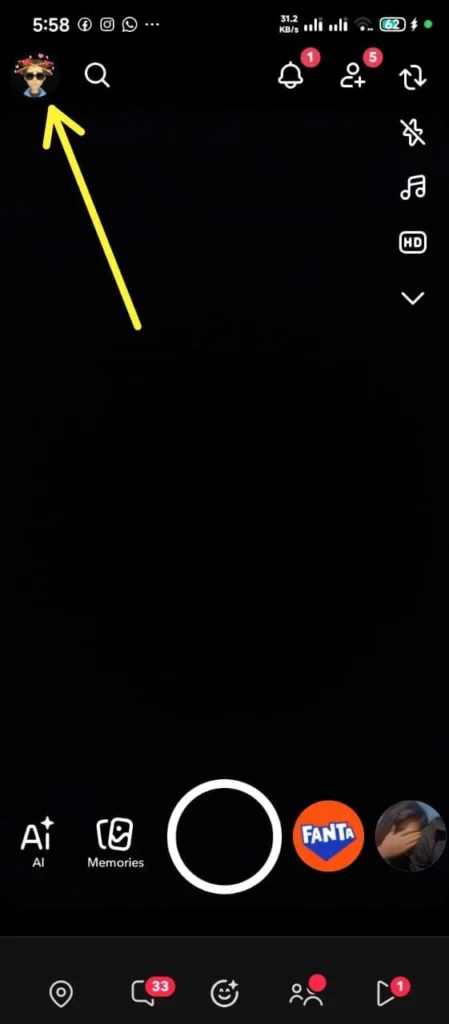
- Open Snapchat and tap your Bitmoji Profile Icon in the top-left corner of the screen.
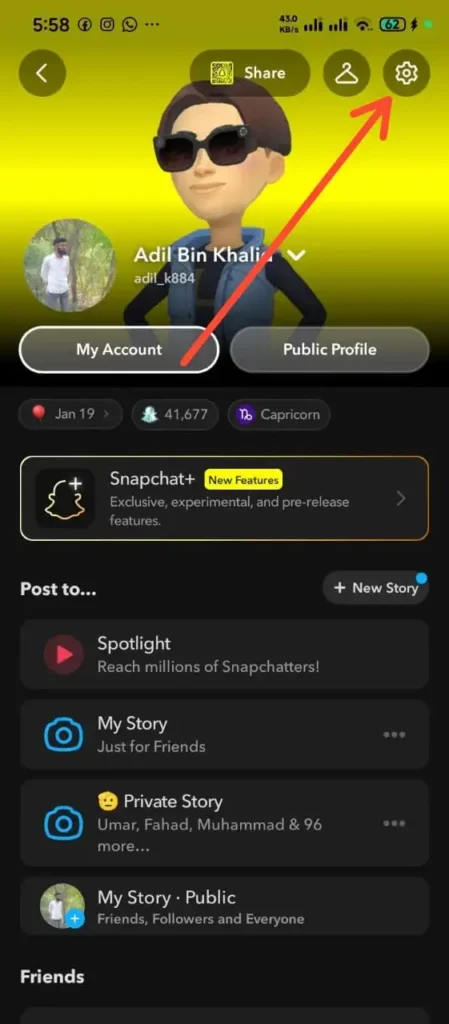
- Tap the Settings Gear Icon located in the top-right corner.
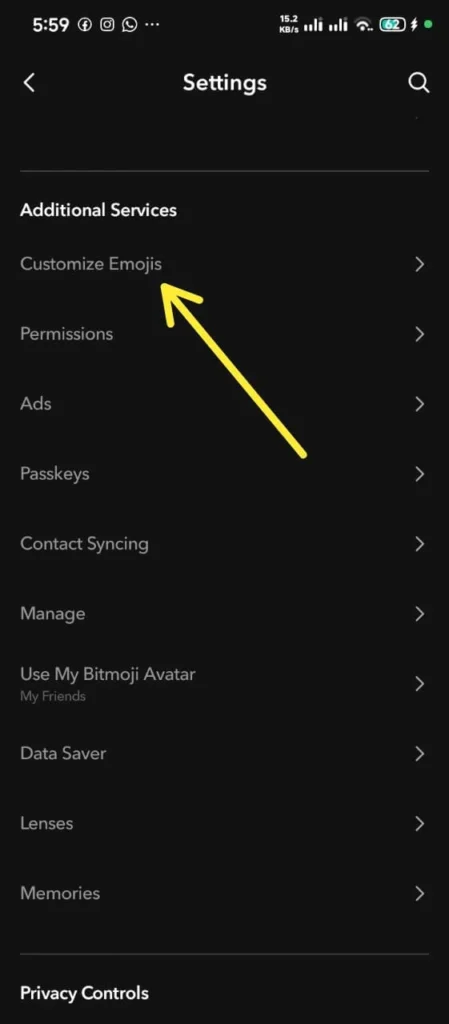
- Scroll down to the “Additional Services” section and select Customize Emojis (or Friend Emojis on some devices).
- Tap the specific friendship status category you want to modify (such as Super BFF, Mutual BFF, or Snapstreak).
- Browse the available symbol list and select any replacement icon you prefer.
- Tap the back arrow to save your configuration.
If you ever want to revert back to factory settings, navigate to the bottom of the Customize Emojis menu and tap Reset to Default.
Common Misconceptions About Snapchat Relationships
There are numerous persistent urban legends regarding how Snapchat ranks account relationships. Let us address and clarify the most common myths:
- Myth 1: “Checking someone’s profile or story moves them up your Best Friends list.”
- Fact: Merely viewing someone’s public story, tapping on their profile card, or checking their location on Snap Map has zero impact on your Best Friends calculation. The algorithm calculates direct, active messaging interactions only.
- Myth 2: “Group messages boost individual friendship ranks fast.”
- Fact: Sending a message into a group chat spreads interaction score across all participants. Direct one-on-one camera snaps are infinitely more powerful for increasing your rank with a specific individual.
- Myth 3: “Sending a single snap can instantly make someone your #1 Best Friend.”
- Fact: The algorithm values consistent, multi-day interaction. A single snap will rarely displace an established top friend who has accumulated hundreds of messages with you over several weeks.
Step-by-Step Troubleshooting for Common Issues
Issue 1: My Yellow Heart Didn’t Turn Into a Red Heart After Two Weeks
- Cause: You or your top friend likely dropped from the mutual #1 spot for a brief period during those 14 days, resetting the continuous timer.
- Solution: Ensure that both you and your contact send your highest daily snap volume exclusively to each other every single day without interruption.
Issue 2: A Contact Replaced My Best Friend Unexpectedly
- Cause: You exchanged a high volume of media or text messages with a secondary contact over a short period, causing their score to surpass your previous Best Friend.
- Solution: To restore your original ranking order, increase direct camera snap volume with your preferred contact while reducing interaction with others.
Issue 3: My Snapstreak Flame Disappeared
- Cause: Neither you nor your friend sent a direct camera snap within the required 24-hour window.
- Solution: Use the built-in Snapchat streak restoration option in your chat settings, or contact Snapchat support to request a manual streak recovery.
Frequently Asked Questions
How many people can fit on my Snapchat Best Friends list?
Your list can hold a maximum of eight contacts at any given time.
Can I have a Yellow Heart with multiple friends simultaneously?
No. The Yellow Heart symbol is strictly reserved for your single top mutual connection. You can only have one Yellow Heart active on your account at a time.
Does voice calling or video calling affect Best Friend rankings?
Yes. Engaging in direct voice or video calls using the Snapchat app contributes significantly to your overall relationship interaction score with that contact.
Why did my Red Heart symbol vanish suddenly?
Your Red Heart symbol disappears if either you or your top contact stops sending enough messages to hold the #1 position mutually, or if a third contact exceeds your overall communication volume.
Conclusion
The Snapchat Best Friends list is a practical, user-focused feature designed to streamline daily communication. By automatically placing your most frequent contacts right at the top of your camera send screen, Snapchat eliminates friction and helps you stay connected with your real-world inner circle.
Whether you are preserving long-term Snapstreaks with flame counters, working your way toward Pink Hearts with a close companion, or using Snapchat Plus features like the Friend Solar System to analyze relative communication orbits, understanding how these tools operate allows you to manage your social interactions with ease. Keep communicating consistently with the people who matter most to you, and your Best Friends list will naturally align with your true real-world connections.