
Snapchat has completely changed how we connect, share moments, and chat with friends through daily Snaps and Stories. To give active users even more control and exclusive tools, Snap Inc introduced Snapchat Plus, a premium paid membership packed with secret features, app customization options, and advanced AI utilities.
Want to know whether this paid upgrade is worth your money? You are in the right place. In this complete guide, we will cover everything about Snapchat Plus including exact dollar pricing, subscription plans, hidden features, step by step activation, and how to cancel anytime.
Understanding Snapchat Plus
Snapchat Plus is an optional paid subscription service built inside the main Snapchat mobile app. It is designed for everyday power users who want to upgrade their messaging experience.
It is very important to know that Snapchat Plus does not replace the normal free version of Snapchat. You do not need to pay any money to use Snapchat. Standard features like sending Snaps, chatting, making video calls, using basic camera filters, and viewing public Stories remain completely free for everyone.
Instead, Snapchat Plus acts as an extra layer of premium tools. When you subscribe, your account unlocks extra visual styles, detailed friendship insights, smart artificial intelligence utilities, and direct customer support.
Snap Inc officially announced that Snapchat Plus has surpassed 25 million active paid subscribers worldwide. This massive milestone proves how popular these exclusive tools and customization options have become among daily users.
Main Differences Between Free Snapchat and Snapchat Plus
Free Snapchat
Allows basic messaging, video calling, sending daily snaps, posting 24-hour stories, and talking to the basic My AI chat assistant.
Snapchat Plus
Gives you extra tools like story rewatch stats, protection for long Snapstreaks, custom story timer options, special profile badges, custom app icons, and the famous Friend Solar System.
Table of Snapchat Plus Features
Before we look at the details of every tool, here is a simple breakdown of what you get with Snapchat Plus:
| Feature Category | What It Does | Who It Helps |
| Friend Insights | Shows the Friend Solar System and lets you pin a #1 Best Friend | People who want to organize their top friends |
| Story Analytics | Shows who rewatches your stories and lets you change story timers | Content creators and active story posters |
| Streak Safety | Gives you automatic streak alerts and one-tap streak restoration | Users who want to save long Snapstreaks from dying |
| Artificial Intelligence | Upgrades My AI to scan real-world items and create custom stickers | Tech lovers and creative users |
| App Customization | Lets you change app icons, chat wallpapers, and alert sounds | People who love personalizing their phone screens |
Social Insights and Friend Tools
Snapchat Plus gives you special tools to see how you interact with your close friends on the app.
The Friend Solar System
The Friend Solar System (Snapchat Planets) is one of the most famous features in Snapchat Plus. It creates a fun 3D space map where you are the Sun in the middle, and your top eight best friends are planets orbiting around you.
Your position in a friend’s solar system depends on how many snaps and messages you exchange with each other every day.

Mercury
Your #1 Best Friend (Closest orbit)

Venus
Your #2 Best Friend

Earth
Your #3 Best Friend

Mars
Your #4 Best Friend

Jupiter
Your #5 Best Friend

Saturn
Your #6 Best Friend

Uranus
Your #7 Best Friend

Neptune
Your #8 Best Friend
Best Friend Pinning (#1 BFF)
If you chat with many people every day, important conversations can easily get pushed down your chat screen. With Best Friend Pinning, you can lock your favorite friend to the top of your chat list. No matter how many messages you receive from other people, your pinned best friend stays right at the top.
Peek-a-Peek (Live Chat Awareness)
The Peek-a-Peek feature shows a small eye icon next to a chat window the exact second your friend opens your conversation. This lets you know if someone is reading older messages or getting ready to type a reply.
Story Tools and View Stats
If you regularly post photos and video updates to your Snapchat Story, Snapchat Plus gives you useful analytics and controls that regular users do not have.
The Story Rewatch Counter
On standard Snapchat, you can only see a list of people who viewed your story. Snapchat Plus adds a special Rewatch Counter with an eye symbol next to your story posts. This counter shows you how many times your friends replayed your photos or video clips.
If you see a high rewatch number on a specific photo or video, it means your friends really enjoyed that content.
Custom Story Expiration Timers
Regular Snapchat stories automatically vanish after 24 hours. Snapchat Plus lets you change this rule according to your needs:
- Short Timers (1 Hour or 6 Hours): Great for temporary updates, quick questions, or live location shares.
- Long Timers (2 Days, 3 Days, or 1 Week): Perfect for major life updates, party announcements, or vacation photo dumps.
Priority Story Replies
When you send a reply to a story posted by a famous influencer, celebrity, or public account, Snapchat Plus highlights your reply and moves it near the top of their message box. This gives you a much higher chance of getting a reply or a like from large accounts.
Snapstreak Protection and Recovery
Many users spend years building long daily Snapstreaks with their friends. Losing a 500-day streak due to a busy day or a bad internet connection can be very disappointing. Snapchat Plus acts as a helpful safety system for your streaks.
Expiration Warning Alerts
Snapchat Plus sends an automated notification to your phone exactly 1 hour before an active Snapstreak is about to expire. This warning gives you enough time to send a quick snap and keep your streak alive.
One-Tap Snapstreak Restore
If you accidentally miss the deadline and lose a streak, Snapchat Plus gives you built-in tools to bring the streak back with a single tap inside the app. You do not need to fill out long help forms or contact customer support.
Detailed Feature Guide 4: Advanced AI Features and Creative Tools
Snapchat continues to add smart artificial intelligence features to its premium subscription tier.
Upgraded My AI Capabilities
All users can talk to the basic My AI bot, but Snapchat Plus subscribers get faster responses and extra camera-scanning powers:
- Sign and Text Reading: Take a photo of street signs or parking rules to understand what they mean.
- Menu Translation: Take a picture of a menu in a foreign language to read food items clearly.
- Object Identification: Point your camera at plants, animals, or items to get quick information about them.
Text-to-Sticker Generator
Instead of searching through thousands of standard emojis, you can type a short sentence describing what sticker you want. The AI instantly generates a brand new sticker that you can drop directly into your chat.
Detailed Feature Guide 5: Visual Customization and Themes
Snapchat Plus allows you to redesign the visual look of your app so it matches your personal taste.
Custom Home Screen App Icons
You do not have to keep the traditional bright yellow Snapchat icon on your phone home screen. Subscribers can pick from over 30 different designs, including dark black, neon glow, gold metallic, or soft pastel colors.
Custom Chat Backgrounds
You can assign different wallpapers to individual friend chats. You can use your own photos or generate unique AI backgrounds. Setting distinct wallpapers helps you instantly recognize who you are messaging so you never send a text to the wrong group chat.
Subscriber Star Badge
Snapchat Plus members get a subtle black-and-gold star badge on their public profile. This badge shows other people that you are a subscriber, but you can turn it off in your settings whenever you want.
Snapchat Plus Pricing and Global Cost Breakdown (2026)
Snapchat sets different prices depending on where you live and which payment plan you select. Paying for a full year upfront offers the biggest savings compared to monthly payments.
| Subscription Plan | United States (USD) | India (INR) | Effective Monthly Rate | Primary Key Benefits & Savings |
| Monthly Plan | $3.99 / month | ₹49 / month | $3.99 / mo | Full access to all features; best for short-term testing |
| 6-Month Plan | $21.99 upfront | Regional rates vary | ~$3.67 / mo | Unlocks all premium tools with ~8% overall cost savings |
| Annual (Yearly) Plan | $39.99 upfront | ₹499 / year | ~$3.33 / mo | Best Value: Maximum overall savings (~37% discount) |
| Platinum Tier (Select Regions) | Varies by region | Not Available | Varies | 100% Ad-free experience + priority story views & all perks |
| Lens+ Tier (Select Regions) | ~$8.99 / month | Not Available | ~$8.99 / mo | Access to exclusive Generative AI filters & custom AR Lenses |
Step-by-Step Guide: How to Subscribe in 60 Seconds
Setting up Snapchat Plus on your iPhone or Android device is very simple:
- Open the Snapchat app on your phone.
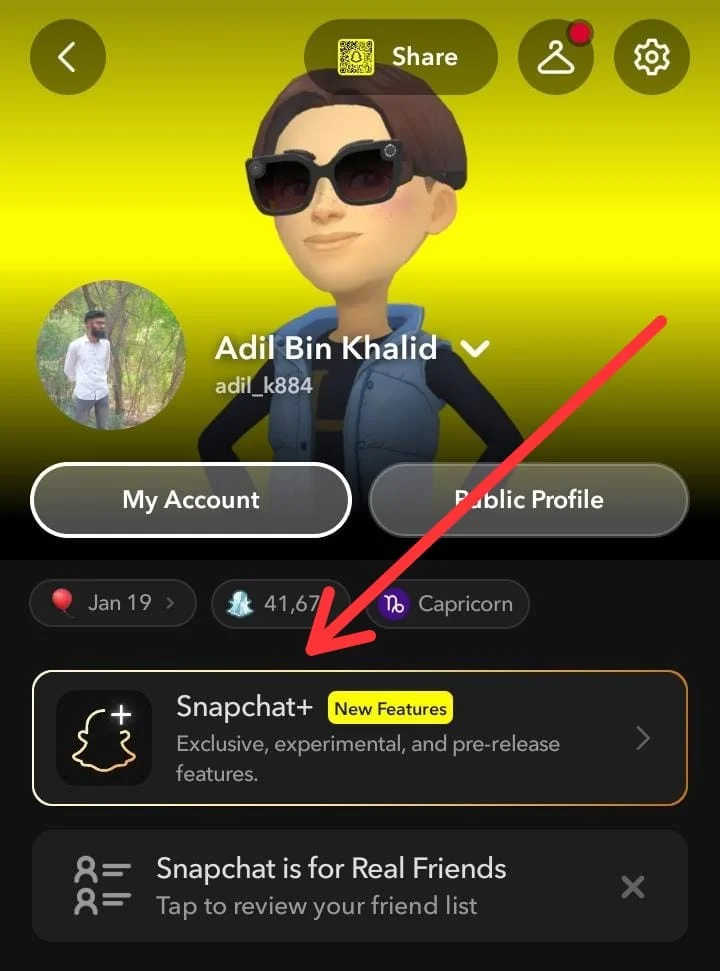
- Tap your Bitmoji profile icon in the top-left corner of the screen.
- Look for the Snapchat+ Banner right under your account display name and tap it.
- Choose whether you want to pay Monthly or Yearly.
- Confirm your payment using Apple Pay, Google Pay, or your credit card.
- Close Snapchat and open it again to refresh your account and unlock all new settings.
How to Cancel Snapchat Plus Safely
If you decide that you no longer want to pay for Snapchat Plus, you must cancel your subscription through your smartphone’s app store settings:
- Open your iPhone Settings.
- Tap your Apple ID name at the top.
- Tap Subscriptions.
- Select Snapchat+ from the list.
- Tap Cancel Subscription and confirm.
- Open the Google Play Store app.
- Tap your Profile Icon in the top-right corner.
- Tap Payments & Subscriptions, then select Subscriptions.
- Find Snapchat+ and tap Cancel Subscription.
Helpful Tips for Snapchat Plus Power Users
If you want to get the best value out of your subscription, keep these simple tips in mind:
- Use Expiration Alerts for Important Streaks: Turn on notification permissions so you never miss the 1-hour warning before a long Snapstreak dies.
- Track Audience Interest: Check your story rewatch numbers regularly. If your friends replay a video multiple times, post similar updates in the future.
- Keep Your Settings Private: If you do not want people to talk about your Friend Solar System rank or know that you pay for Snapchat Plus, simply turn off the badge and orbit toggles inside your settings menu.
Conclusion
Deciding whether to upgrade to Snapchat Plus in 2026 comes down to your personal daily app habits and how much value you place on detailed social insights. If you are a casual user who opens the app just a few times a week to reply to close family or friends, the free standard version provides all the essential messaging, calling, and snapping tools you need. Paying for a subscription in that scenario is largely unnecessary, as core features remain completely free and accessible without spending a single dollar.
However, for dedicated power users, streak enthusiasts, and content creators, Snapchat Plus offers exceptional value that easily justifies the small monthly cost. Features like automated streak expiration alerts, story rewatch analytics, custom expiration timers, and the iconic Friend Solar System transform the app into a personalized social toolkit. By opting for an annual plan at roughly $3.33 per month, daily users gain reliable streak safety nets and creative customization options that significantly elevate the overall Snapchat experience.
Frequently Asked Questions
Does Snapchat notify someone when I check their planet position?
No. Checking your rank in a friend’s solar system or viewing their planet badge is completely private. Snapchat does not send any notification to the other person.
Will I lose my custom chat wallpapers if my subscription ends?
Yes. If your subscription expires, your app icon will change back to the standard yellow design, custom wallpapers will disappear, and your pinned friends will return to standard sorting.
Can I hide my Snapchat Plus star badge?
Yes. Go to your Snapchat profile, tap the Snapchat+ card, and toggle off the Subscriber Badge switch.
Leave a Reply