Category: Snapchat Guide

  • Why Snapchat Streaks Are Important Meaning Benefits and Psychology Behind the Flame

    Why Snapchat Streaks Are Important Meaning Benefits and Psychology Behind the Flame

    You open Snapchat on any given day. You immediately notice small flame icons next to the display names of your closest contacts. Beside these flames sit numbers like 10 or 50 or 200 or even over 1000. These numbers represent Snapstreaks. This feature is one of the most clever highly engaging social tools ever introduced to mobile communication.

    What originally started as a small visual metric tracking daily picture exchanges between friends has grown into a major cultural habit. Maintaining a streak is far more than just tapping a screen for millions of daily app users. It is a daily ritual and a reflection of commitment and a direct measurement of digital friendship.

    Users care deeply about keeping these continuous counters alive. People panic when an Hourglass icon appears.

    In this comprehensive guide we will break down everything you need to know about Snapchat Streaks in clear simple English. We will cover what streaks actually mean and why they carry immense social weight and how the core technical rules function and how you can restore a lost streak when your counter vanishes unexpectedly.

    What Is a Snapchat Streak The Simple Core Concept

    At its absolute foundational level a Snapstreak commonly referred to simply as a Streak measures how many continuous days two specific friends have sent direct camera snaps to each other.

    The feature kicks off automatically after you and a friend exchange direct photo or video snaps at least once every 24 hours for three consecutive days.

    • Day 1 and Day 2: You send snaps back and forth building up the initial momentum behind the scenes.
    • Day 3: A small Flame icon appears alongside a number 3 right next to your friend’s name in the main chat feed.
    • Day 4 and Beyond: Every single consecutive day that both participants send at least one direct camera snap the streak counter ticks upward by one.

    Either person forgets to send a qualifying snap within a 24-hour window. The entire counter resets back to zero. This strict rule gives streaks their unique value and urgency.

    The Role of Snapchat Streaks in Gen Z Digital Culture

    Generation Z approaches digital communication and relationship maintenance in a unique way. Understanding this cultural context explains why streaks carry immense social weight among younger users.

    Younger generations view digital interactions and real-world social ties as deeply connected parts of life. Online friendships carry genuine emotional weight. Snapchat functions as a main venue for daily interaction with close friends. Industry data reveals that the platform reaches nearly ninety percent of teenagers and young adults in many countries. This massive reach makes it one of the most influential communication tools today.

    The strong preference for Snapchat stems from its focus on authenticity and low social pressure. Traditional platforms preserve content permanently for public viewing. Snapchat relies on temporary media. Users share moments without fearing permanent judgment. Streaks and private stories act as clear relational signals. Digital friendship badges and best friend markers hold real emotional meaning within peer groups.

    Younger users appreciate that Snapchat provides personal connection without performance anxiety. Public counters for likes or followers create social competition on other platforms. Snapchat eliminates those metrics. Users interact comfortably at their own pace without seeking constant public approval. This design matches generational values that prioritize real moments over staged perfection.

    The Psychology Why Do Snapchat Streaks Matter So Much

    To understand why users invest months and sometimes years into keeping a number alive we must look at human behavior and psychological habit formation and digital social norms.

    Gamification of Social Messaging

    Gamification happens when an app applies game mechanics like point tracking and achievements and levels and streak scores to non-game activities. Snapchat was one of the earliest platforms to successfully gamify direct personal messaging.

    Snapchat gives every friendship a visible growing score. It turns daily conversation into a cooperative game. Hitting major milestones like a 100-day or 500-day streak provides a continuous feeling of personal achievement that keeps users coming back daily.

    Digital Proof of Relationship Strength

    We live in a world overflowing with passive social media interactions. Liking a post takes less than half a second. A Snapstreak represents active intentional effort.

    You cannot automate a streak. Maintaining a high number signals that two people value each other enough to prioritize daily contact. It acts as an unspoken social contract stating that we are close enough that we talk every single day without fail.

    Loss Aversion and Don’t Break the Chain

    Psychologists frequently discuss a phenomenon known as Loss Aversion. Humans feel significantly more emotional pain from losing something they already possess than they feel pleasure from acquiring something new.

    You build a streak to 300 days. That number represents ten solid months of shared daily habit. Neither participant wants to be the person who breaks the chain and wipes out that accumulated progress. This creates a powerful drive to keep snapping every day.

    Low-Pressure Daily Connection

    Traditional phone calls or long text chats require mental energy and time and focus. A camera snap takes two seconds.

    Sending a quick picture of your morning desk or your lunch or the weather gives friends a way to stay present in each other’s lives without the pressure of maintaining a lengthy written conversation.

    The Core Benefits of Keeping Active Snapstreaks

    The primary appeal of a streak is personal satisfaction. Maintaining multiple active streaks also provides several tangible perks inside the platform.

    Benefit AreaWhat It MeansWhy It Matters
    Snap Score GrowthIncreases your overall account activity scoreReflects high platform engagement on your profile
    Special Emoji UnlocksUnlocks exclusive milestone indicatorsDisplays badges like the 100-day counter symbol
    Best Friends PriorityPositions active contacts near the top of your send listMakes sharing moments faster and more convenient
    Long-Distance ConnectionKeeps distant friends connected dailyEliminates the awkwardness of losing touch over time
    Group Social DynamicsCreates mutual routines across friend circlesBuilds a shared habit among mutual classmates or peers

    Rapid Snap Score Increases

    Your public Snap Score is calculated based on the total volume of snaps you send and receive. Maintaining five or ten or twenty daily streaks forces you to exchange multiple pieces of media every day. Your overall account score will climb much faster than that of a casual user.

    Preserving Bonds Across Long Distances

    Close friends move to different cities for university or work or family reasons. Keeping in touch can become challenging. A Snapstreak removes the friction of distance. Receiving a quick two-second snapshot every day reassures both friends that they remain an active part of each other’s lives.

    The Golden Rules What Counts and What DOES NOT Count

    Snapchat users experience frustration when losing a streak despite feeling like they communicated with their friend that day. Snapchat enforces very specific strict guidelines regarding what qualifies as a valid streak snap.

    Media That WILL Keep Your Streak Alive:

    • Direct Camera Photos: Taking a picture right inside the Snapchat app camera and sending it directly to an individual user.
    • Direct Camera Videos: Recording a short video clip inside the Snapchat app and sending it directly to an individual user.

    Media That WILL NOT Keep Your Streak Alive:

    • Standard Text Messages: Typing a text message in the chat thread does not count toward your streak.
    • Camera Roll Uploads: Uploading old photos or videos saved from your phone’s gallery roll does not count.
    • Memories Shares: Re-sending saved posts from your Snapchat Memories folder does not count.
    • Group Chat Snaps: Sending a picture or video into a multi-person group chat does not count for individual member streaks.
    • Posting Stories: Publishing a picture or video to your public or private or main Snapchat Story does not count.
    • Voice and Video Calls: Calling your friend directly through the app does not register for streak progress.

    Essential Snapchat Streak Symbols Explained

    Snapchat uses distinct visual icons next to contact names to help you track your streak status at a glance.

    The Flame Icon

    The Flame symbol confirms that an active Snapstreak is ongoing. The number next to the flame indicates the exact number of consecutive days you and your friend have successfully kept the streak alive.

    The Hourglass Symbol

    The Hourglass icon is an urgent alert system. It appears when your 24-hour communication window is nearing its end.

    You see the Hourglass. That means time is running out. At least one person must send a direct photo or video snap immediately to prevent the streak from expiring and resetting to zero.

    The 100-Day Milestone

    Your streak reaches exactly 100 continuous days. Snapchat celebrates the milestone by displaying the 100 Emoji alongside the standard flame icon.

    Proactive Strategies How to Never Lose a Streak Again

    You manage multiple streaks. Keeping track of daily snaps can get chaotic. Here are practical real-world habits to protect your counters:

    The Morning Routine Method

    The most reliable way to maintain your streaks is to send your daily snaps early in the morning. You send your snaps right after waking up. You give your friends a wide 24-hour window to respond and completely eliminate late-night Hourglass panics.

    Send Simple Blank or Streak Snaps

    You do not need to create a masterpiece every single time you snap. You are busy at work or studying or traveling. Simply take a photo of a plain background and type the letter S or the word Streaks and hit send. It takes three seconds and satisfies the algorithm completely.

    Edit Display Names for Easy Sorting

    You have hundreds of contacts. Finding your streak partners can take time. You can edit your friends’ display names by adding a small prefix like a letter or symbol so all your active streak partners group together at the top of your contact list.

    Double-Check Transmission Status

    Always verify that your snap actually went through. Weak Wi-Fi networks or poor cellular data can cause snaps to stay in Pending status. A snap fails to send. It will not count toward your daily 24-hour requirement.

    How to Restore a Lost Snapchat Streak Step-by-Step

    A technical error or app glitch or server outage causes your streak to disappear unexpectedly. Do not worry. Snapchat provides built-in recovery pathways to get your hard-earned counter back.

    Method 1 In-App Quick Restore Direct Feature

    1. Open Snapchat and swipe right to your Chat Feed.
    2. Look for the contact name where the streak recently vanished.
    3. Your account is eligible for immediate recovery. A small Restore button will appear right next to the chat thread.
    4. Tap Restore and follow the prompt to instantly bring back your original streak number.

    Method 2 Submitting a Manual Support Ticket

    The quick restore option does not appear on your screen. You can file an official request with Snapchat Support:

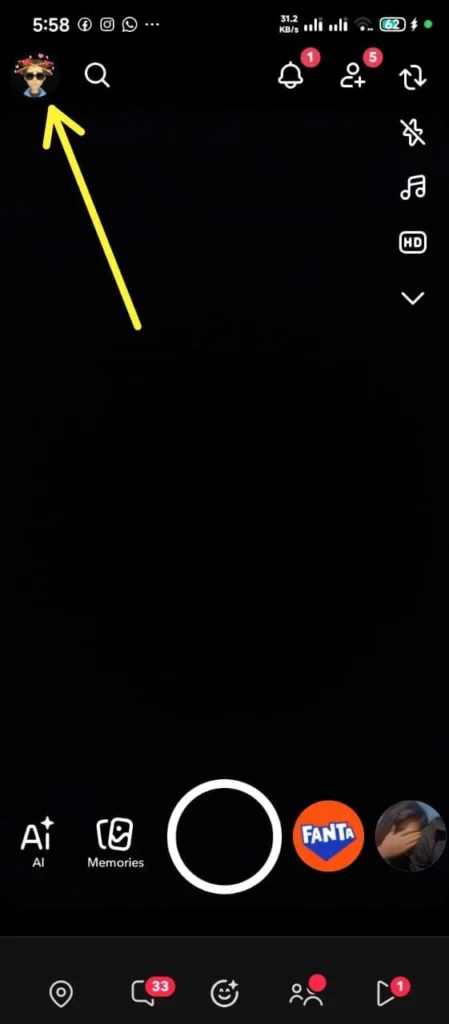
    1. Open Snapchat and tap your Profile Icon in the top-left corner.
    2. Tap the Settings Gear Icon in the top-right corner.
    3. Scroll down to the Support heading and select I Need Help.
    4. Search for Snapstreak and tap I lost my Snapstreak.
    5. Complete the official form with your details:
      • Your exact Username
      • Your verified Email Address
      • Your Mobile Phone Number
      • Your Friend’s exact Username
      • The date the streak disappeared
      • Your best estimate of what the streak count was
    6. Tap Submit. Your information is correct. Snapchat Support typically restores the streak within 24 to 48 hours.

    Frequently Asked Questions FAQs

    Why are Snapchat Streaks so important to younger users

    Streaks offer a visual and fun and quantifiable way to measure closeness and keep daily habits alive with friends without requiring long written conversations.

    Can you restore a lost Snapstreak for free

    Yes. Snapchat offers free in-app restores for eligible accounts and support tickets submitted for technical issues are processed free of charge.

    What time of day do Snapchat Streaks reset

    Streaks do not reset at a fixed hour like midnight. Each individual streak operates on its own 24-hour clock based on when the last qualifying snap was sent.

    Do text chats or group messages maintain a streak

    No. Standard text messages and stickers and voice notes and group snaps do not count. Only individual direct camera photo and video snaps keep a streak active.

    Conclusion

    Snapchat Streaks have transformed ordinary messaging into a rewarding habit-forming experience. Streaks combine gamification and visual milestones and low-friction daily contact to provide a fun way to stay connected with the people who matter most.

    You manage a single streak with a best friend or hold down dozens of long-term counters across your friend circle. Understanding the core rules and recovery steps ensures your digital connections stay strong and unbroken!

  • What is Snapchat+? Complete Guide to Features, Plans, and Benefits (2026)

    What is Snapchat+? Complete Guide to Features, Plans, and Benefits (2026)

    Snapchat has completely changed how we connect, share moments, and chat with friends through daily Snaps and Stories. To give active users even more control and exclusive tools, Snap Inc introduced Snapchat Plus, a premium paid membership packed with secret features, app customization options, and advanced AI utilities.

    Want to know whether this paid upgrade is worth your money? You are in the right place. In this complete guide, we will cover everything about Snapchat Plus including exact dollar pricing, subscription plans, hidden features, step by step activation, and how to cancel anytime.

    Understanding Snapchat Plus

    Snapchat Plus is an optional paid subscription service built inside the main Snapchat mobile app. It is designed for everyday power users who want to upgrade their messaging experience.

    It is very important to know that Snapchat Plus does not replace the normal free version of Snapchat. You do not need to pay any money to use Snapchat. Standard features like sending Snaps, chatting, making video calls, using basic camera filters, and viewing public Stories remain completely free for everyone.

    Instead, Snapchat Plus acts as an extra layer of premium tools. When you subscribe, your account unlocks extra visual styles, detailed friendship insights, smart artificial intelligence utilities, and direct customer support.

    Snap Inc officially announced that Snapchat Plus has surpassed 25 million active paid subscribers worldwide. This massive milestone proves how popular these exclusive tools and customization options have become among daily users.

    Main Differences Between Free Snapchat and Snapchat Plus

    Free Snapchat

    Allows basic messaging, video calling, sending daily snaps, posting 24-hour stories, and talking to the basic My AI chat assistant.

    Snapchat Plus

    Gives you extra tools like story rewatch stats, protection for long Snapstreaks, custom story timer options, special profile badges, custom app icons, and the famous Friend Solar System.

    Table of Snapchat Plus Features

    Before we look at the details of every tool, here is a simple breakdown of what you get with Snapchat Plus:

    Feature CategoryWhat It DoesWho It Helps
    Friend InsightsShows the Friend Solar System and lets you pin a #1 Best FriendPeople who want to organize their top friends
    Story AnalyticsShows who rewatches your stories and lets you change story timersContent creators and active story posters
    Streak SafetyGives you automatic streak alerts and one-tap streak restorationUsers who want to save long Snapstreaks from dying
    Artificial IntelligenceUpgrades My AI to scan real-world items and create custom stickersTech lovers and creative users
    App CustomizationLets you change app icons, chat wallpapers, and alert soundsPeople who love personalizing their phone screens

    Social Insights and Friend Tools

    Snapchat Plus gives you special tools to see how you interact with your close friends on the app.

    The Friend Solar System

    The Friend Solar System (Snapchat Planets) is one of the most famous features in Snapchat Plus. It creates a fun 3D space map where you are the Sun in the middle, and your top eight best friends are planets orbiting around you.

    Your position in a friend’s solar system depends on how many snaps and messages you exchange with each other every day.

    Mercury
    Your #1 Best Friend (Closest orbit)

    Venus
    Your #2 Best Friend

    Earth
    Your #3 Best Friend

    Mars
    Your #4 Best Friend

    Jupiter
    Your #5 Best Friend

    Saturn
    Your #6 Best Friend

    Uranus
    Your #7 Best Friend

    Neptune
    Your #8 Best Friend

    Best Friend Pinning (#1 BFF)

    If you chat with many people every day, important conversations can easily get pushed down your chat screen. With Best Friend Pinning, you can lock your favorite friend to the top of your chat list. No matter how many messages you receive from other people, your pinned best friend stays right at the top.

    Peek-a-Peek (Live Chat Awareness)

    The Peek-a-Peek feature shows a small eye icon next to a chat window the exact second your friend opens your conversation. This lets you know if someone is reading older messages or getting ready to type a reply.

    Story Tools and View Stats

    If you regularly post photos and video updates to your Snapchat Story, Snapchat Plus gives you useful analytics and controls that regular users do not have.

    The Story Rewatch Counter

    On standard Snapchat, you can only see a list of people who viewed your story. Snapchat Plus adds a special Rewatch Counter with an eye symbol next to your story posts. This counter shows you how many times your friends replayed your photos or video clips.

    If you see a high rewatch number on a specific photo or video, it means your friends really enjoyed that content.

    Custom Story Expiration Timers

    Regular Snapchat stories automatically vanish after 24 hours. Snapchat Plus lets you change this rule according to your needs:

    • Short Timers (1 Hour or 6 Hours): Great for temporary updates, quick questions, or live location shares.
    • Long Timers (2 Days, 3 Days, or 1 Week): Perfect for major life updates, party announcements, or vacation photo dumps.

    Priority Story Replies

    When you send a reply to a story posted by a famous influencer, celebrity, or public account, Snapchat Plus highlights your reply and moves it near the top of their message box. This gives you a much higher chance of getting a reply or a like from large accounts.

    Snapstreak Protection and Recovery

    Many users spend years building long daily Snapstreaks with their friends. Losing a 500-day streak due to a busy day or a bad internet connection can be very disappointing. Snapchat Plus acts as a helpful safety system for your streaks.

    Expiration Warning Alerts

    Snapchat Plus sends an automated notification to your phone exactly 1 hour before an active Snapstreak is about to expire. This warning gives you enough time to send a quick snap and keep your streak alive.

    One-Tap Snapstreak Restore

    If you accidentally miss the deadline and lose a streak, Snapchat Plus gives you built-in tools to bring the streak back with a single tap inside the app. You do not need to fill out long help forms or contact customer support.

    Detailed Feature Guide 4: Advanced AI Features and Creative Tools

    Snapchat continues to add smart artificial intelligence features to its premium subscription tier.

    Upgraded My AI Capabilities

    All users can talk to the basic My AI bot, but Snapchat Plus subscribers get faster responses and extra camera-scanning powers:

    • Sign and Text Reading: Take a photo of street signs or parking rules to understand what they mean.
    • Menu Translation: Take a picture of a menu in a foreign language to read food items clearly.
    • Object Identification: Point your camera at plants, animals, or items to get quick information about them.

    Text-to-Sticker Generator

    Instead of searching through thousands of standard emojis, you can type a short sentence describing what sticker you want. The AI instantly generates a brand new sticker that you can drop directly into your chat.

    Detailed Feature Guide 5: Visual Customization and Themes

    Snapchat Plus allows you to redesign the visual look of your app so it matches your personal taste.

    Custom Home Screen App Icons

    You do not have to keep the traditional bright yellow Snapchat icon on your phone home screen. Subscribers can pick from over 30 different designs, including dark black, neon glow, gold metallic, or soft pastel colors.

    Custom Chat Backgrounds

    You can assign different wallpapers to individual friend chats. You can use your own photos or generate unique AI backgrounds. Setting distinct wallpapers helps you instantly recognize who you are messaging so you never send a text to the wrong group chat.

    Subscriber Star Badge

    Snapchat Plus members get a subtle black-and-gold star badge on their public profile. This badge shows other people that you are a subscriber, but you can turn it off in your settings whenever you want.

    Snapchat Plus Pricing and Global Cost Breakdown (2026)

    Snapchat sets different prices depending on where you live and which payment plan you select. Paying for a full year upfront offers the biggest savings compared to monthly payments.

    Subscription PlanUnited States (USD)India (INR)Effective Monthly RatePrimary Key Benefits & Savings
    Monthly Plan$3.99 / monthβ‚Ή49 / month$3.99 / moFull access to all features; best for short-term testing
    6-Month Plan$21.99 upfrontRegional rates vary~$3.67 / moUnlocks all premium tools with ~8% overall cost savings
    Annual (Yearly) Plan$39.99 upfrontβ‚Ή499 / year~$3.33 / moBest Value: Maximum overall savings (~37% discount)
    Platinum Tier (Select Regions)Varies by regionNot AvailableVaries100% Ad-free experience + priority story views & all perks
    Lens+ Tier (Select Regions)~$8.99 / monthNot Available~$8.99 / moAccess to exclusive Generative AI filters & custom AR Lenses

    Step-by-Step Guide: How to Subscribe in 60 Seconds

    Setting up Snapchat Plus on your iPhone or Android device is very simple:

    • Open the Snapchat app on your phone.
    • Tap your Bitmoji profile icon in the top-left corner of the screen.
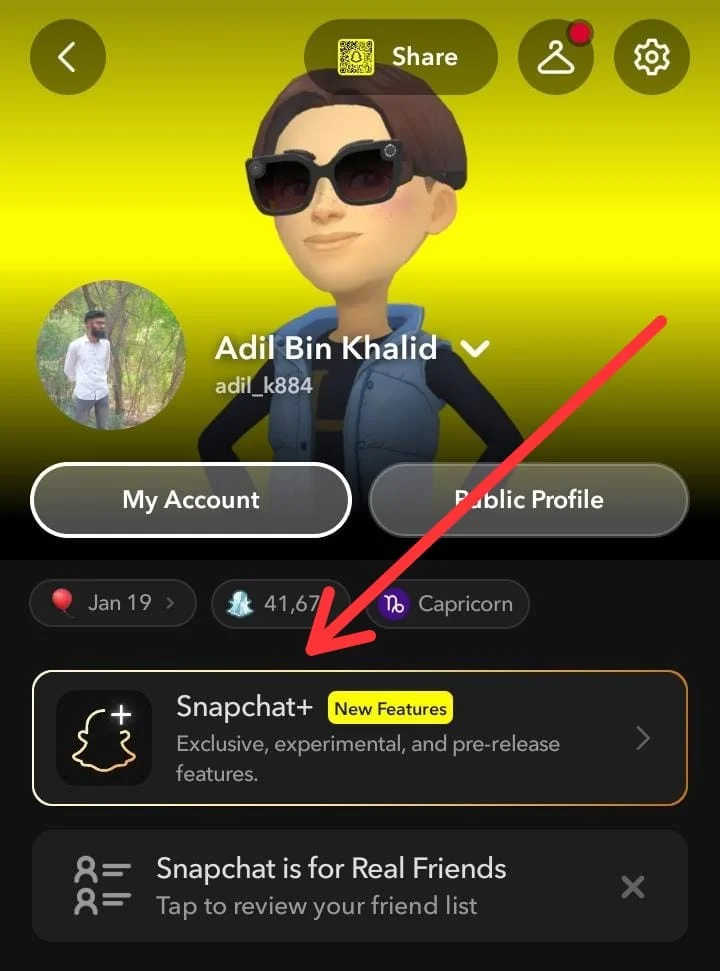
    • Look for the Snapchat+ Banner right under your account display name and tap it.
    • Choose whether you want to pay Monthly or Yearly.
    • Confirm your payment using Apple Pay, Google Pay, or your credit card.
    • Close Snapchat and open it again to refresh your account and unlock all new settings.

    How to Cancel Snapchat Plus Safely

    If you decide that you no longer want to pay for Snapchat Plus, you must cancel your subscription through your smartphone’s app store settings:

    On iPhone (iOS):

    • Open your iPhone Settings.
    • Tap your Apple ID name at the top.
    • Tap Subscriptions.
    • Select Snapchat+ from the list.
    • Tap Cancel Subscription and confirm.

    On Android:

    • Open the Google Play Store app.
    • Tap your Profile Icon in the top-right corner.
    • Tap Payments & Subscriptions, then select Subscriptions.
    • Find Snapchat+ and tap Cancel Subscription.

    Helpful Tips for Snapchat Plus Power Users

    If you want to get the best value out of your subscription, keep these simple tips in mind:

    • Use Expiration Alerts for Important Streaks: Turn on notification permissions so you never miss the 1-hour warning before a long Snapstreak dies.
    • Track Audience Interest: Check your story rewatch numbers regularly. If your friends replay a video multiple times, post similar updates in the future.
    • Keep Your Settings Private: If you do not want people to talk about your Friend Solar System rank or know that you pay for Snapchat Plus, simply turn off the badge and orbit toggles inside your settings menu.

    Conclusion

    Deciding whether to upgrade to Snapchat Plus in 2026 comes down to your personal daily app habits and how much value you place on detailed social insights. If you are a casual user who opens the app just a few times a week to reply to close family or friends, the free standard version provides all the essential messaging, calling, and snapping tools you need. Paying for a subscription in that scenario is largely unnecessary, as core features remain completely free and accessible without spending a single dollar.

    However, for dedicated power users, streak enthusiasts, and content creators, Snapchat Plus offers exceptional value that easily justifies the small monthly cost. Features like automated streak expiration alerts, story rewatch analytics, custom expiration timers, and the iconic Friend Solar System transform the app into a personalized social toolkit. By opting for an annual plan at roughly $3.33 per month, daily users gain reliable streak safety nets and creative customization options that significantly elevate the overall Snapchat experience.

    Frequently Asked Questions

    Does Snapchat notify someone when I check their planet position?

    No. Checking your rank in a friend’s solar system or viewing their planet badge is completely private. Snapchat does not send any notification to the other person.

    Will I lose my custom chat wallpapers if my subscription ends?

    Yes. If your subscription expires, your app icon will change back to the standard yellow design, custom wallpapers will disappear, and your pinned friends will return to standard sorting.

    Can I hide my Snapchat Plus star badge?

    Yes. Go to your Snapchat profile, tap the Snapchat+ card, and toggle off the Subscriber Badge switch.

  • Snapchat Story Viewer Complete Guide

    Snapchat Story Viewer Complete Guide

    Modern social media applications have completely changed how people interact and share daily moments online. Snapchat became extremely popular because photos and short video clips disappear after twenty-four hours. This quick-disappearing format makes people curious about what their friends and favorite public personalities share every day.

    Official Snapchat application rules show view history clearly. The mobile app logs every single user handle that opens a published story. The original content creator views that complete list inside their personal account dashboard. This visible tracking system builds honesty among close contacts. It also creates awkward feelings when someone prefers looking at a public story without leaving a digital trace.

    People often prefer watching public updates quietly without showing their account name. This common desire led to the creation of special online tools called Snapchat Story Viewers. These web tools let visitors stream and save public images and video loops without creating a personal profile or logging into any app.

    Using these online viewing portals safely requires a basic understanding of network links and privacy limits and device protection rules.

    This master guide explains every single detail about anonymous story viewing portals in simple, clear English. We will explore how these websites function and why people use them and common security hazards plus safe procedures to save public visual content.

    What Is a Snapchat Story Viewer Tool

    A Snapchat Story Viewer represents a free online utility designed to display publicly accessible social media posts. It enables web visitors to view pictures and short video clips without entering personal account credentials.

    The official application records your personal account handle whenever you view a story inside the app. External viewing websites operate completely outside the main platform system. They pull publicly broadcasted media assets from open web locations and render them cleanly inside standard web browsers.

    Simple Features Offered by Web Viewers

    • Silent Story Watching: Viewing open public stories without placing your profile name on view registries.
    • Direct File Saving: Storing clear public photos and video clips directly onto phone memory or computer drives.
    • No Account Needed: Checking public account posts without creating a personal Snapchat profile.
    • Universal Device Compatibility: Running smoothly across mobile phones and tablet screens and desktop browser setups.

    Gen Z Digital Habits and Silent Browsing Trends

    Younger app users maintain unique habits regarding social media interaction and personal privacy management. Generation Z utilizes platforms with disappearing posts for daily chat and self-expression. They also care deeply about controlling their personal online footprints.

    Checking open public profiles represents a completely natural part of modern digital communication. Young people frequently monitor public updates without wanting to start a direct message thread or signal active personal attention. Silent browsing offers a comfortable barrier against unwanted social exchanges and awkward online situations.

    Younger web users value selecting precise moments when their handle attaches to social media activity. Independent viewing tools fit this strong preference for quiet observation across public social networks.

    Technical Steps How Anonymous Viewers Get Media

    External viewing websites do not use secret software tricks or backdoor passes to unlock accounts. They simply run basic internet requests to fetch and display open media files.

    • Locating Open Public Web Links: Public influencers and commercial brand profiles publish media onto open web directories accessible everywhere. Viewing tools send rapid automated requests to those open web coordinates to collect available public photos and video files.
    • 2 Utilizing Proxy Server Shields: The viewing site acts like a protective bridge between your browser and destination servers. The web tool fetches the target public media asset first. It then displays that media onto your device screen. Destination servers observe only the website IP address instead of your personal handle.
    • Displaying Media in Your Web Browser: The collected photos and video loops play straight inside your active web browser window. The original account owner observes generic web server requests rather than your individual user handle.

    Step-by-Step Technical Workflow

    Understanding how web tools process network requests helps users see why anonymity remains protected during public story viewing.

    [Visitor Device] ——> [Third-Party Proxy Server] ——> [Public Snapchat Media Host]
    |                                                                                   |
    |<———————— Streamed Public Video and Image Files <———————————|

    Stage 1: Entering the Targeted Username

    The web user opens the story viewer page inside a browser. The user types the exact public username into the search bar. The tool validates the text string to ensure valid formatting before initiating server requests.

    Stage 2: Request Dispatching

    The web tool sends automated network packets toward public server endpoints. These requests search exclusively for active public broadcasts associated with the specified account name.

    Stage 3: Media Buffer Extraction

    When active public media files exist the third-party proxy server downloads temporary cache files onto its own remote drives. This step insulates the end visitor from direct contact with host platforms.

    Stage 4: Display Rendering

    The viewing site displays the extracted video files and images inside an easy browser player. The end visitor watches the content while remaining completely invisible to host monitoring systems.

    Public Accounts Versus Private Accounts Important System Limits

    Many people feel confused about what content third-party web tools can actually pull down. Knowing these clear system limits prevents you from falling for widespread internet scams.

    Account TypeWho Can See ItCan Online Tools Display It
    Public ProfilesAnyone on the web around the worldYes, public media can be collected easily
    Spotlight VideosShared openly across global feedsYes completely viewable using online tools
    Locked Personal AccountsRestricted strictly to approved mutual friendsNo impossible for external tools to view
    Custom Private StoriesShared with selected circle friends onlyNo totally protected by account security

    The Truth About Fake Private Account Viewers

    Numerous websites claim they can bypass privacy settings to reveal private accounts or hidden personal stories. These statements are total scams designed to trick web visitors.

    Private profile media requires active account login approval and confirmed mutual friend status. Websites asking for money or survey answers to unlock private accounts collect personal data maliciously or distribute harmful software.

    Deep Dive: Why Fake Private Profile Viewers Are Dangerous

    Scam sites targeting curious users cause severe damage. Understanding how these fake tools operate protects your personal data and digital equipment.

    Survey Wall Scams

    Fake lookup portals display animated progress bars claiming to fetch private account media. When the progress bar reaches completion the site pauses and demands completing length surveys. These surveys capture personal details like phone numbers and email addresses for spam marketing lists.

    Malicious Application Downloads

    Some fake private viewers require downloading specific software files or mobile utilities before unlocking hidden content. These downloadable files frequently contain harmful tracking software or malware designed to monitor device activity.

    Premium Subscription Traps

    Certain deceptive portals ask for credit card verification under the promise of a small verification charge. Visitors who enter card details find themselves enrolled in recurring monthly billing programs without explicit consent.

    Primary Reasons People Use Anonymous Viewers

    People turn to third-party story viewing tools for many practical and simple personal reasons.

    Browsing Without Social Pressure

    People often want to check public updates from acquaintances or public figures without appearing on active view lists. Anonymous browsing avoids false assumptions and social misunderstandings.

    Studying Public Content and Competitor Campaigns

    Social media managers and digital creators monitor competitor posts on open profiles. Saving public videos lets research teams study creative formats for commercial planning.

    Watching Content Without Installing Apps

    Some people choose not to hold personal social media accounts or prefer avoiding mobile application downloads. Web utilities offer easy access to viral clips and public updates without setup hassles.

    Comprehensive Popular Third-Party Tools Comparison

    Comparing web lookup sites requires checking safety standards and video playback performance across different service providers.

    Tool NameAnonymous ViewDownload OptionPassword NeededDevice SupportMain Feature
    StoryLookerFull AnonymityHigh Quality DownloadsNo Login NeededAll Phones & ComputersProfile picture display support
    SpyBroskiFull AnonymityVideo & Photo StorageNo Login NeededAll Phones & ComputersExtended highlight archive options
    SnapGenrFull AnonymityDirect File ArchivingNo Login NeededAll Phones & ComputersFast processing loading speeds
    StoryBoxFull AnonymityBasic File SavingNo Login NeededAll Phones & ComputersSimple and clean web design
    ON4T ViewerFull AnonymityStream Only AccessNo Login NeededAll Phones & ComputersClean page without pop-up ads
    MegaStoryFull AnonymityMultiple File DownloadsNo Login NeededAll Phones & ComputersBulk media download capability

    Detailed Tool Reviews and Usability Analysis

    Evaluating individual web tools helps users pick the safest and most efficient service for their browsing needs.

    StoryLooker Deep Review

    StoryLooker features a clean interface optimized for fast media playback. It extracts public story clips along with open profile visual details. The site operates smoothly across mobile browsers without displaying aggressive pop-up advertisements.

    SpyBroski Usability Evaluation

    SpyBroski focuses on media archiving. It allows users to view active public stories and older saved highlights present on public accounts. Its simple search bar delivers rapid server responses.

    SnapGenr Speed Performance

    SnapGenr prioritizes quick server processing. The portal handles high traffic volume efficiently reducing video buffering time for desktop and mobile visitors.

    StoryBox Interface Overview

    StoryBox delivers a lightweight browsing experience designed for low speed internet links. It strips away heavy web scripts enabling simple media playback on older mobile devices.

    ON4T Viewer Privacy Focus

    ON4T Viewer provides a clean browser environment focused on streaming. The site avoids intrusive ad networks keeping device memory usage extremely light during active sessions.

    MegaStory Batch Utility

    MegaStory caters to users needing multiple media file downloads. It includes simple file selection buttons letting visitors store entire public story sequences with minimal effort.

    Simple Troubleshooting Fixing Common Viewer Errors

    Web viewing utilities encounter operational errors due to network restrictions or server updates. Knowing simple fixes keeps your browsing smooth.

    This error happens when typing a misspelled user handle or searching a private, locked profile. Always double-check exact username spelling and verify the targeted account publishes open public content.

    Heavy web traffic on proxy servers causes loading delays. Refreshing your web browser page or clearing browser temporary cache files usually fixes network speed.

    Some pop-up blockers accidentally stop file download scripts on viewer sites. Turning off aggressive browser ad blockers temporarily allows file downloads to function correctly.

    A blank media player usually points to outdated browser scripts or unsupported video formats. Switching to an updated modern browser resolves visual rendering glitches instantly.

    How Marketers Use Public Viewers for Professional Work

    Anonymous viewing utilities serve genuine professional functions beyond casual personal browsing curiosity.

    • Analyzing Competitor Accounts: Marketing teams study story sequence structures and daily post frequency of competing businesses without showing corporate interest.
    • Tracking Popular Social Trends: Content creators watch popular camera filters and video layouts across top public profiles to plan better original posts.
    • Saving Creative Ideas: Designers save public video styles and font layouts to build inspiration files for future media campaigns.
    • Auditing Influencer Partners: Brand managers check public engagement quality and posting consistency of potential influencer partners before signing sponsorship deals.

    Security Risks Found on Unsafe Websites

    While silent media viewing offers convenience using unknown third-party websites involves noticeable safety risks.

    Fake Survey Verification Traps

    Unsafe viewing sites show fake loading screens claiming to gather account data. They suddenly pause progress and demand completing long surveys or downloading unknown apps or entering payment details.

    Password Theft and Account Hacking

    Safe web tools never ask for your personal account details or login passwords. Any site demanding your personal Snapchat account username and password is trying to steal your account.

    Annoying Pop-Up Ads and Unsafe Links

    Unregulated viewer sites host persistent pop-up ad networks. Tapping these ads can cause accidental app downloads or put tracking cookies inside your browser.

    Cybersecurity Best Practices for Safe Web Browsing

    Protecting personal equipment and identity tags requires active precaution when interacting with third-party web services.

    Utilize Dedicated Privacy Browsers

    Browsing through privacy-focused web browsers reduces exposure to malicious ad networks. Modern privacy browsers automatically block third-party tracking cookies and unwanted pop-up redirects.

    Avoid Entering Personal Phone Numbers

    Never submit mobile phone numbers on external utility sites. Unregulated portals often subscribe submitted phone numbers to expensive premium text messaging services without clear warning.

    Regularly Clear Local Cache Data

    Clearing temporary web files and browser cookies regularly removes leftover tracking scripts left behind by unverified third-party utility pages.

    Easy Safety Rules for Online Browsing

    Following basic internet safety rules protects your phone and personal data whenever you test online tools.

    • Keep Passwords Private: Never share personal social media passwords on external websites.
    • Skip Survey Requirements: Leave websites demanding survey answers or software downloads immediately.
    • Use Modern Web Browsers: Use updated web browsers equipped with active ad blockers and safety tools.
    • Remember System Limits: Keep in mind that private accounts stay completely hidden from external tools.

    Simple Procedures to Save Public Media Safely

    Saving public visual content requires prioritizing device safety while respecting original creators.

    Procedure 1: Using Smartphone Screen Recorders

    The safest option to save open video content uses built-in phone features. Modern mobile phones have native screen recording tools that capture screen video clearly without visiting risky websites.

    Procedure 2: Direct Web Browser Downloads

    Opening public media directly inside computer web browsers often allows right clicking open video streams to save media files straight to local computer folders.

    Procedure 3: Utilizing Device Screenshot Captures

    Taking basic display screenshots offers an instant method for storing still images posted on public profiles. This simple method bypasses external site downloads entirely while keeping personal device storage completely secure.

    Content Retention and Storage Guidelines

    Managing downloaded visual media properly ensures personal storage stays organized without violating intellectual property boundaries.

    • Organize Dedicated Media Folders: Create separate storage directories on local drives to keep saved public research media distinct from personal photos.
    • Monitor Storage Usage: High-definition video clips consume significant storage space quickly. Delete temporary research files regularly to maintain device performance.
    • Verify File Formats: Ensure downloaded media saves in standard formats like MP4 for video clips and JPEG for photos to guarantee universal media player support.

    Simple Rules About Copyright and Online Ethics

    Using third-party viewing tools requires thinking about copyright rules and proper online behavior. Watching publicly shared stories is normal open web browsing. Creators who share posts publicly accept that people around the world can view their content.

    Original creators own full rights to their photos and video clips regardless of where they post them. Saving public media for personal viewing is common practice. Re-posting or selling copyrighted visual work created by other people without permission violates copyright laws.

    Responsible Social Media Observation Principles

    Maintaining ethical standards while exploring public social content builds a healthier digital environment for everyone.

    Respect Personal Boundaries

    Avoid using third-party utilities to collect public content for negative social behavior or personal harassment. Public posts should be viewed with neutral intent.

    Protect Intellectual Attribution

    Whenever referencing creative ideas derived from public social posts give appropriate credit to original creators rather than presenting their work as your own original creation.

    Avoid Content Redistribution

    Public stories fetched through external tools belong strictly to original account owners. Avoid sharing downloaded visual assets onto external video channels or social platforms.

    Frequently Asked Questions

    Can an anonymous viewer show hidden private stories?

    No. External tools collect open public posts only. Private account posts require mutual friend approval and stay locked behind server security.

    Will account owners know you watched their story through a website?

    No. Web tools fetch public posts using independent server bridges. Your personal user handle never enters the creator view list.

    Do online viewer tools require making an account?

    Safe utility tools work completely free without asking for account signups or personal passwords.

    Is saving public social media content legal?

    Downloading public media for personal offline viewing is common web practice. Re-uploading or selling copyrighted media created by others without permission breaks copyright laws.

    Why do some public usernames show no active stories?

    An account handle might be correct yet show no media if the user has not posted visual updates within the past twenty-four hours or if the story expired.

    Can online story viewers access deleted Snapchat posts?

    No. Once a public story expires after twenty-four hours or gets manually deleted by the account holder external viewing servers lose access immediately.

    Conclusion

    Snapchat Story Viewers offer simple access to explore open public posts quietly without making personal accounts or downloading mobile apps. These tools help people who want simple browsing privacy and researchers studying social media trends.

    Remembering account privacy limits remains very important. External web tools access open public accounts only. Any website claiming to show private locked profiles is a safety scam. Practice good internet safety habits and protect personal passwords while enjoying open web content responsibly,

  • Snapchat Best Friends List Explained: How It Works, Order, Algorithm, and Management Hacks (2026)

    Snapchat Best Friends List Explained: How It Works, Order, Algorithm, and Management Hacks (2026)

    Social media platforms have undergone massive transformations over the last decade. Most public networking platforms focus heavily on public performance, encouraging users to collect followers, accumulate public likes, and broadcast their personal lives to thousands of strangers.

    Snapchat took an entirely different design path from its very inception. Built primarily around private, direct communication, Snapchat prioritizes personal one-on-one relationships over public follower counts. One of the central engines driving this private user experience is the Snapchat Best Friends List.

    If you open Snapchat every day to send photos, videos, or quick texts, you have certainly noticed a curated list of contacts near the top of your send screen. You may have also noticed distinct text symbols or colored icons next to specific names.

    Understanding how this list functions behind the scenes, how Snapchat’s algorithm measures your daily interactions, and what these friendship indicators mean will give you complete clarity over your digital social life.

    What Is the Snapchat Best Friends List?

    The Snapchat Best Friends list is an automated, algorithmically updated list containing the contacts with whom you communicate most frequently on the platform. Whenever you take a photo or record a video clip using the Snapchat camera, clicking the yellow “Send To” arrow brings up your chat contacts. Positioned right at the top of this menu is your Best Friends section.

    The primary purpose of this feature is practical convenience. Instead of forcing you to manually scroll through hundreds of phone contacts or type someone’s username into a search bar every time you want to share a quick moment, Snapchat automatically places your most frequent conversational partners right under your thumb.

    It is essential to realize that the Best Friends list is not a permanent or static list. You do not manually build it by selecting checkboxes, nor is it locked in place permanently. Instead, it is a fluid, dynamic system that adjusts continually based on your real-time messaging behavior.

    Key Rules and System Characteristics

    • Automatic Generation: Snapchat’s internal system continuously evaluates your conversation habits and selects your top connections without requiring any manual setup from you.
    • Eight-Friend Limit: Your account can host up to eight best friends at any given point in time.
    • Strict Individual Privacy: Since major system updates aimed at user privacy, your official Best Friends list is completely private to your account. External users cannot visit your profile and view a public directory of your top friends.
    • Visual Status Indicators: Unique visual indicators (such as heart symbols, flame counters, or smiling faces) appear alongside contact names to denote specific interaction milestones and friendship levels.

    How the Snapchat Best Friends Algorithm Works (Behind the Scenes)

    Many users mistakenly believe that adding someone as a contact or viewing their public story brings them straight to the top of their Best Friends list. In reality, Snapchat uses a complex, proprietary calculation algorithm designed to measure genuine social engagement.

    The algorithm relies primarily on two fundamental pillars: Reciprocity and Consistency.

    The Reciprocity Principle (Two-Way Interaction)

    The absolute cornerstone of Snapchat’s relationship algorithm is mutual communication. Reciprocity means that both participants must actively contribute to the conversation.

    If you send fifty snaps a day to a popular content creator, a public figure, or a acquaintance who rarely replies, that person will never become your Best Friend on Snapchat. The algorithm rewards balanced communication where Person A sends messages to Person B, and Person B actively sends messages back to Person A.

    Frequency and Communication Volume

    The system tracks the overall number of interactions exchanged between two accounts over rolling time windows. However, volume alone is not the only metric. The distribution of that volume matters significantly.

    Exchanging ten snaps every single day for a week generates a vastly higher friendship score than sending seventy snaps in one single burst on Sunday afternoon and remaining inactive for the remainder of the month. Regular daily communication signals strong social ties to the algorithm.

    Media Weighting: Camera Snaps vs. Text Chat

    While both traditional text messages and direct camera snaps count toward your friendship ranking, direct photo and video snaps carry noticeably more mathematical weight within the algorithm.

    Because taking a photo or recording a short video requires more effort than typing a quick text word, Snapchat’s system interprets direct camera snaps as higher-value social interactions. Group chat activity also contributes to your score, but individual one-on-one exchanges carry far greater statistical weight.

    Quick Reference Guide: Snapchat Friend Status Indicators

    To help you understand your relationship status at a single glance, Snapchat assigns specific symbols to contacts based on your interaction patterns. Here is a clear breakdown of what each major indicator signifies:

    EmojiIndicator NamePlain Text DescriptionDetailed Meaning in Simple English
    πŸ’›Yellow HeartTop Mutual Best FriendYou are #1 Best Friends with each other. You send the most snaps to them, and they send the most to you.
    ❀️Red HeartTwo-Week Best FriendYou and this friend have maintained your mutual #1 Best Friend status continuously for 2 straight weeks.
    πŸ’•Pink HeartsTwo-Month Super BFFYou and this friend have held the mutual #1 Best Friend position for 2 consecutive months without interruption.
    😊Smiling FaceStandard Best FriendThis contact sits within your top 8 Best Friends list, but they are not your overall #1 connection.
    😎Sunglasses FaceMutual Close FriendYou and this person share a close friend in common on your respective Best Friends lists.
    😬Grimacing FaceShared #1 Best FriendYour absolute #1 Best Friend is also this person’s absolute #1 Best Friend.
    😏Smirking FaceOne-Sided Best FriendYou are on their Best Friends list, but they are not on your Best Friends list.
    πŸ”₯Snapstreak (Flame)Daily Streak CounterYou and this contact have snapped each other every day for 3 or more consecutive days.
    βŒ›HourglassExpiration WarningYour active Snapstreak is about to expire unless both of you send a camera snap soon.
    πŸ’―Hundred100-Day MilestoneYou and this connection have maintained a continuous Snapstreak for 100 consecutive days.
    πŸŽ‚Birthday CakeSpecial Occasion AlertIt is this friend’s birthday today based on their account profile settings.

    Explaining Every Friend Status Symbol in Detail

    Understanding what each symbol represents enables you to analyze your social dynamics effortlessly. Let us examine each major status indicator in depth.

    The Yellow Heart (Mutual #1 Best Friend) πŸ’›

    The Yellow Heart is the foundational symbol of top-tier closeness on Snapchat. It indicates that you and this specific contact are mutually each other’s single biggest conversational partner.

    To achieve a Yellow Heart, two conditions must be met simultaneously:

    1. You must send more snaps and messages to this person than to anyone else in your contact list.
    2. This person must send more snaps and messages to you than to anyone else in their contact list.

    If you send the absolute highest volume of messages to a friend, but that friend sends their highest volume to someone else, you will not earn a Yellow Heart. You will instead see a standard Smiling Face indicator.

    The Red Heart (Two-Week Loyalty Milestone) ❀️

    The Red Heart represents sustained consistency. When you and your mutual #1 Best Friend manage to keep your Yellow Heart status active for fourteen consecutive days without losing the top spot to another contact, the system automatically upgrades your symbol from a Yellow Heart to a deep Red Heart.

    The Pink Hearts (Two-Month Super BFF Status) πŸ’•

    The Pink Hearts indicator is the highest honor of friendship available on standard Snapchat. This milestone requires incredible messaging loyalty. You and your top connection must hold the mutual #1 position for two full months (sixty consecutive days).

    If your interaction levels dip even for a single dayβ€”allowing a third contact to temporarily steal the top spotβ€”the counter resets completely, requiring you to start over from the Yellow Heart stage.

    The Smiling Face (Standard Top 8 Best Friend) 😊

    The simple Smiling Face symbol indicates that a contact belongs to your elite top eight Best Friends group. You communicate with them frequently enough to earn a spot near the top of your camera send list. You can have up to seven contacts displaying the Smiling Face symbol at the same time, alongside your single #1 Best Friend.

    The Sunglasses Face (Mutual Connection) 😎

    The Sunglasses symbol does not directly measure the interaction between you and the person who has the icon. Instead, it measures network overlap. It tells you that one of your top eight Best Friends is also on that person’s top eight Best Friends list. It signals that you both belong to the same broader social circle.

    The Grimacing Face (Shared #1 Spot) 😬

    The Grimacing Face symbol reveals an intense social rivalry or shared primary connection. It appears when your primary #1 Best Friend is also the exact primary #1 Best Friend of another user. It shows that both of you are competing for or sharing the same top conversational partner on the app.

    The Snapstreak (Flame) Indicator πŸ”₯

    The Snapstreak symbol displays a Flame icon alongside a numerical counter (for example, Flame 100). This counter tracks how many consecutive days you and a friend have exchanged direct photo or video snaps within strict 24-hour windows.

    To keep a Snapstreak active, both participants must send at least one picture or video snap every 24 hours. Text chats, group messaging, voice calls, and story posts do not count toward preserving a Snapstreak.

    Snapchat Plus vs. Standard Best Friends Features

    While standard Snapchat gives every user access to the basic Best Friends list and status indicators for free, subscribing to Snapchat Plus unlocks additional diagnostic tools that offer deeper insights into your relationship metrics.

    Comprehensive Comparison Table

    Feature DimensionStandard Free Snapchat AccountSnapchat Plus Paid Subscription
    Best Friends List SizeIncludes up to 8 contactsIncludes up to 8 contacts
    Status IndicatorsStandard hearts, flames, and facesStandard indicators + customization options
    Friend PinningStandard chronological sortingPin your #1 Best Friend to the top forever
    Friend Solar SystemNot accessibleDisplays 3D orbit rankings (Mercury to Neptune)
    Streak Loss AlertsStandard push notificationsAdvanced 1-hour warnings + 1-tap streak restores
    Custom Friend SymbolsDefault factory symbols onlyAbility to replace default symbols with custom icons

    The Friend Solar System (Snapchat Planets)

    The Friend Solar System is one of the most talked-about features included with a Snapchat Plus subscription. Instead of simply listing your top friends in a vertical line, the Solar System places your account in the center as the Sun, while assigning planet positions to your top eight best friends based on interaction density:

    Mercury
    Your 1st closest connection

    Venus
    Your 2nd closest connection

    Earth
    Your 3rd closest connection

    Mars
    Your 4th closest connection

    Jupiter
    Your 5th closest connection

    Saturn
    Your 6th closest connection

    Uranus
    Your 7th closest connection

    Neptune
    Your 8th closest connection

    Important Rule: Planet ranks are visible only when both participants hold active Snapchat Plus subscriptions and keep the Friend Solar System toggle enabled in their settings.

    Best Friend Pinning (#1 BFF)

    Power users who converse with dozens of people daily often find that their primary chat list moves around rapidly. Snapchat Plus allows you to lock your main Best Friend permanently to the top position of your chat feed. This ensures your most important conversation remains easily accessible regardless of incoming messages from other contacts.

    Privacy, Visibility, and Safety: Who Can See Your List?

    Privacy settings on social media are vital for maintaining personal boundaries. Over the years, Snapchat has made significant updates to protect user relationship data from unwanted public viewing.

    Is My Best Friends List Public or Private?

    In the early years of Snapchat, anyone visiting your profile could see a public list of your top best friends. This is no longer true. On modern Snapchat, your official Best Friends list is entirely private to your account. No outside user can log in, view your profile, and see a complete list of who you chat with most.

    What Relationship Data Can Others Infer?

    Even though your main list is private, subtle clues can sometimes reveal relationship details to observant contacts:

    • Shared Relationship Symbols: If you and another user share a mutual top contact, status indicators like the Sunglasses Face or Grimacing Face might appear on their screen.
    • Snapstreak Numbers: Your streak counter is visible to both parties involved in that specific daily streak.
    • Solar System Badges: If both you and a friend use Snapchat Plus, tapping each other’s profile badge displays your relative planet position in each other’s solar orbit.

    How to Change, Reorder, or Remove Someone From Your Best Friends List

    Because the Best Friends list is controlled by an automated calculation algorithm, there is no single “Remove” button next to a contact’s name. However, if you want to alter your rankings or remove a specific user from your top list, you can use several effective strategies.

    Method 1: The Organic Interaction Reduction (Recommended)

    The most natural way to remove someone from your Best Friends list is to reduce your messaging activity with them. Simply stop sending them direct snaps and text messages. As your communication volume drops, other contacts with whom you interact more frequently will naturally pass them in score, causing the algorithm to drop them off your top eight list. This process usually takes a few days to take effect.

    Method 2: Hide or Clear the Conversation

    If you simply want to clean up your active chat screen without altering friendship data permanently, you can hide the conversation thread:

    • Launch Snapchat and swipe right to open your Chat Feed.
    • Press and hold the display name of the contact you wish to hide.
    • Tap Chat Settings from the popup menu.
    • Select Clear from Chat Feed.

    Method 3: The Block and Unblock Strategy (Immediate Reset)

    If you require an immediate removal of someone from your Best Friends list without waiting for the algorithm to adjust over time, you can perform a quick friendship reset:

    • Locate the contact’s name in your chat list or search bar.
    • Press and hold their name to open the options menu.
    • Select Manage Friendship, then tap Block.
    • Confirm the block. This instantly removes the user from your contacts and erases all mutual friendship scores.
    • Go to your account Settings, open Blocked Users, and select Unblock.

    Caution: Blocking a contact completely destroys any active Snapstreaks you have built together and resets your mutual conversation history.

    How to Customize Your Friend Status Symbols

    If you find Snapchat’s default hearts and status icons boring, you can easily customize them to suit your personal aesthetic preference.

    Step-by-Step Instructions for Customization:

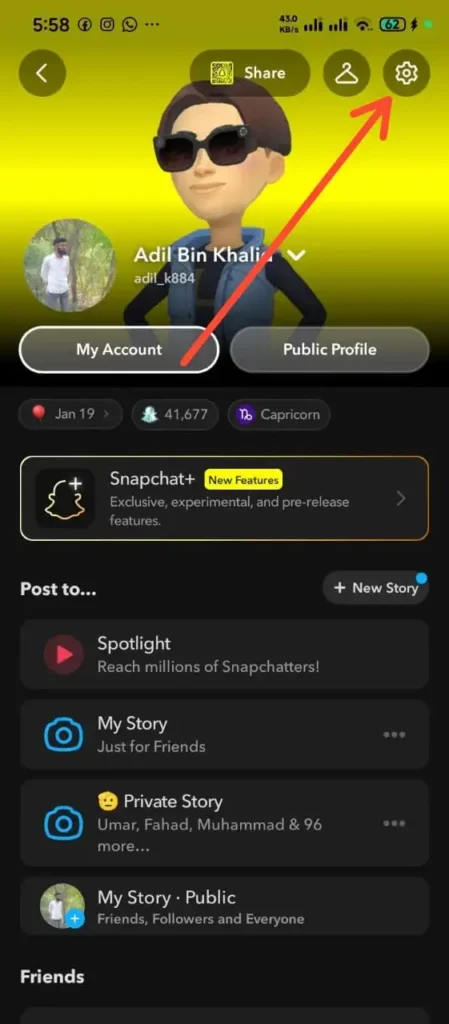
    • Open Snapchat and tap your Bitmoji Profile Icon in the top-left corner of the screen.
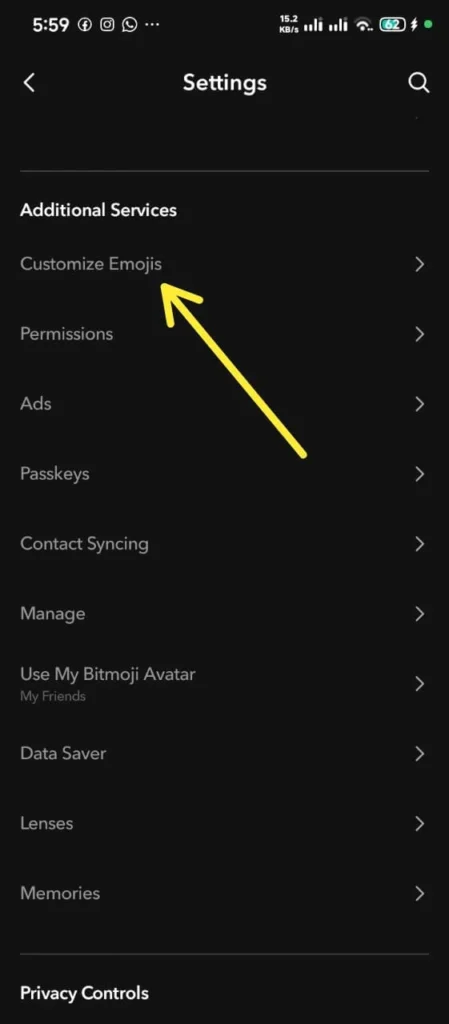
    • Tap the Settings Gear Icon located in the top-right corner.
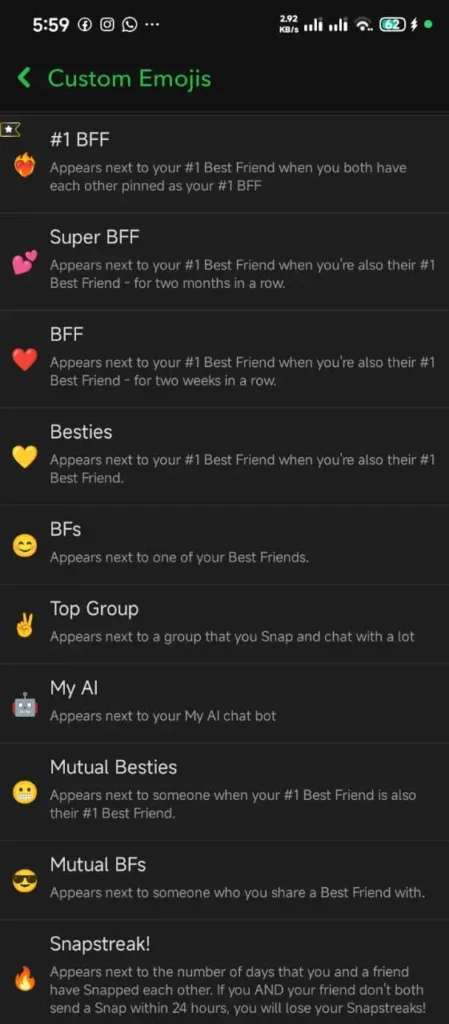
    • Scroll down to the “Additional Services” section and select Customize Emojis (or Friend Emojis on some devices).
    • Tap the specific friendship status category you want to modify (such as Super BFF, Mutual BFF, or Snapstreak).
    • Browse the available symbol list and select any replacement icon you prefer.
    • Tap the back arrow to save your configuration.

    If you ever want to revert back to factory settings, navigate to the bottom of the Customize Emojis menu and tap Reset to Default.

    Common Misconceptions About Snapchat Relationships

    There are numerous persistent urban legends regarding how Snapchat ranks account relationships. Let us address and clarify the most common myths:

    • Myth 1: “Checking someone’s profile or story moves them up your Best Friends list.”
      • Fact: Merely viewing someone’s public story, tapping on their profile card, or checking their location on Snap Map has zero impact on your Best Friends calculation. The algorithm calculates direct, active messaging interactions only.
    • Myth 2: “Group messages boost individual friendship ranks fast.”
      • Fact: Sending a message into a group chat spreads interaction score across all participants. Direct one-on-one camera snaps are infinitely more powerful for increasing your rank with a specific individual.
    • Myth 3: “Sending a single snap can instantly make someone your #1 Best Friend.”
      • Fact: The algorithm values consistent, multi-day interaction. A single snap will rarely displace an established top friend who has accumulated hundreds of messages with you over several weeks.

    Step-by-Step Troubleshooting for Common Issues

    Issue 1: My Yellow Heart Didn’t Turn Into a Red Heart After Two Weeks

    • Cause: You or your top friend likely dropped from the mutual #1 spot for a brief period during those 14 days, resetting the continuous timer.
    • Solution: Ensure that both you and your contact send your highest daily snap volume exclusively to each other every single day without interruption.

    Issue 2: A Contact Replaced My Best Friend Unexpectedly

    • Cause: You exchanged a high volume of media or text messages with a secondary contact over a short period, causing their score to surpass your previous Best Friend.
    • Solution: To restore your original ranking order, increase direct camera snap volume with your preferred contact while reducing interaction with others.

    Issue 3: My Snapstreak Flame Disappeared

    • Cause: Neither you nor your friend sent a direct camera snap within the required 24-hour window.
    • Solution: Use the built-in Snapchat streak restoration option in your chat settings, or contact Snapchat support to request a manual streak recovery.

    Frequently Asked Questions

    How many people can fit on my Snapchat Best Friends list?

    Your list can hold a maximum of eight contacts at any given time.

    Can I have a Yellow Heart with multiple friends simultaneously?

    No. The Yellow Heart symbol is strictly reserved for your single top mutual connection. You can only have one Yellow Heart active on your account at a time.

    Does voice calling or video calling affect Best Friend rankings?

    Yes. Engaging in direct voice or video calls using the Snapchat app contributes significantly to your overall relationship interaction score with that contact.

    Why did my Red Heart symbol vanish suddenly?

    Your Red Heart symbol disappears if either you or your top contact stops sending enough messages to hold the #1 position mutually, or if a third contact exceeds your overall communication volume.

    Conclusion

    The Snapchat Best Friends list is a practical, user-focused feature designed to streamline daily communication. By automatically placing your most frequent contacts right at the top of your camera send screen, Snapchat eliminates friction and helps you stay connected with your real-world inner circle.

    Whether you are preserving long-term Snapstreaks with flame counters, working your way toward Pink Hearts with a close companion, or using Snapchat Plus features like the Friend Solar System to analyze relative communication orbits, understanding how these tools operate allows you to manage your social interactions with ease. Keep communicating consistently with the people who matter most to you, and your Best Friends list will naturally align with your true real-world connections.